
The way to get more Google reviews is to ask every happy customer, every time, and make it a one-tap job for them. Get your Google review link, turn it into a QR code, put it on your invoices and in a text that goes out 24 hours after the job, and reply to every review within 48 hours. That’s the whole system, and there’s nothing complicated about it.
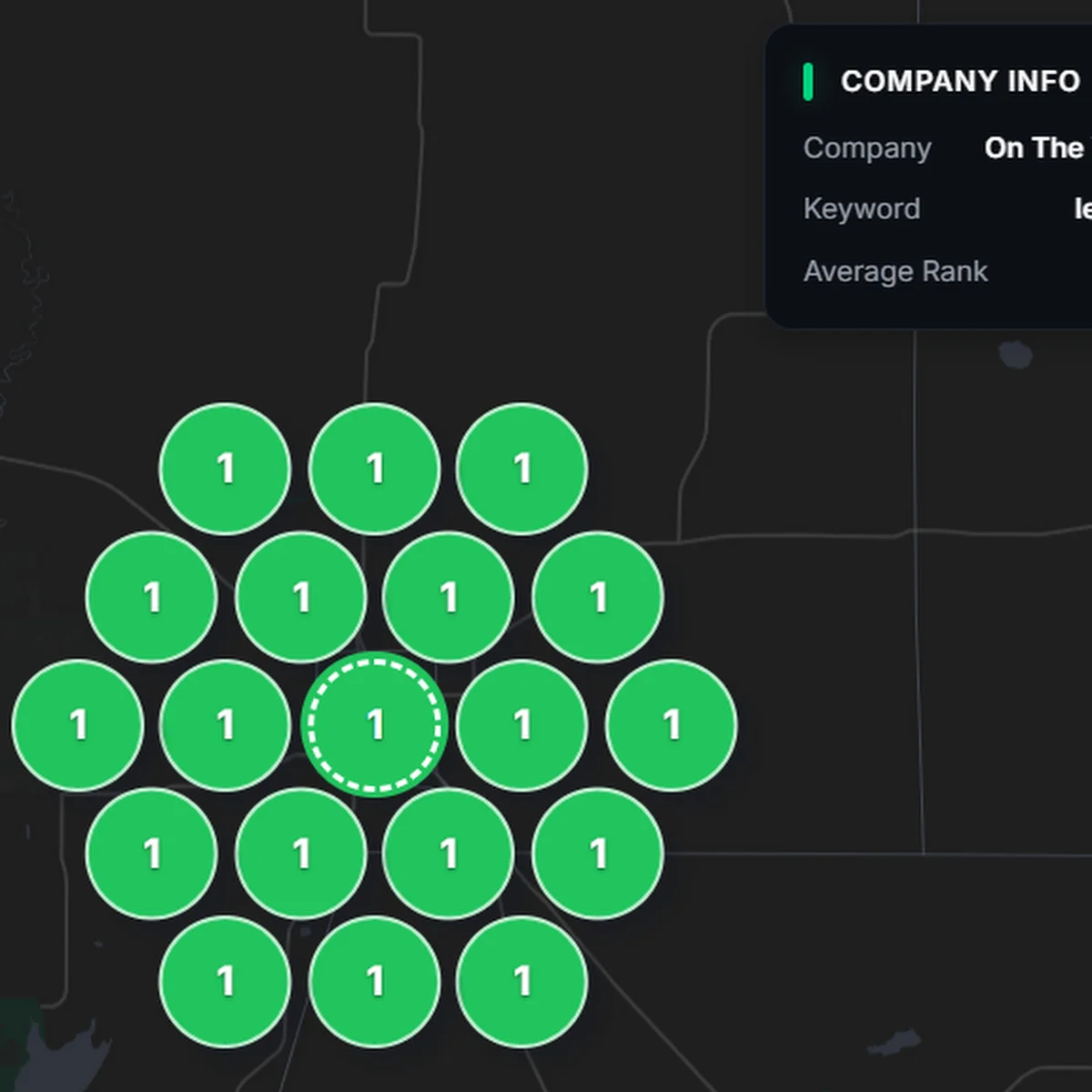
I’m Bobby, and I run local SEO for small businesses out of Glens Falls. Reviews come up in almost every first call I have with an owner. One of my clients, On The Way Plumbing, is now past 300 Google reviews and ranks #1 at all 19 points of their local map grid. Below is exactly how I set this up for clients, plus the one shortcut that will get your profile banned.
Do Google reviews help SEO?
Yes. Reviews are one of the biggest things Google looks at when it decides which three businesses show up in the map pack, the box of local results with the map that sits above the regular listings. Google wants to send people to businesses that other customers trust, and your review count, your star rating and how often new reviews come in all tell Google how much people trust you.
Reviews also do something most owners don’t think about. When a customer writes “they replaced our water heater the same day” and you reply mentioning the water heater replacement, that text sits on your Google Business Profile and connects your business to that service. Over time, those words help you show up for those searches. I’ll come back to that in the section on replies.
Then there’s the plain human side. People compare you to the two other businesses in the map pack before they ever click. If you have 12 reviews and the guy next to you has 140, you’re starting the race from behind.
How many Google reviews do you need?
I tell clients 10 reviews is the minimum. Below that, a lot of people won’t even consider you. You really start earning trust once you pass 50 reviews, because at that point a customer can see a pattern of happy people, not just a handful of friends and family. After that, the goal is a steady flow of new reviews every month. A profile whose newest review is a year old looks like a business that stopped answering the phone.
Step 1: Get your Google review link and a QR code
Your Google review link is a short link that opens the review box for your business directly. The customer doesn’t have to search for you, find your listing, scroll and hunt for the button. One tap and they’re writing.
To get it, sign in to the Google account that manages your business, search for your business name on Google, and open your Google Business Profile. Look for the Ask for reviews (sometimes shown as Get more reviews) option and copy the link it gives you. That’s how to create a Google review link, and it only takes a minute.
Next, turn that link into a Google review QR code. Some profiles show a QR code right in that same box. If yours doesn’t, paste the link into any free QR code generator and download the image.
Now do the two things almost nobody does:
- Save the link in a note on your phone. When a customer says “I’d be happy to leave you a review,” you can text it to them right there instead of saying “just look us up.”
- Keep a photo of the QR code in your phone’s gallery. Pull it up, hold out your phone, and the customer scans it on the spot. It’s the easiest review you’ll ever get.
Step 2: Ask at the end of every job that went well
The biggest reason businesses don’t have reviews is that they don’t ask. Customers are busy. Even people who love you won’t think to go leave a review unless you bring it up.
The best moment to ask is at the end of a job that went well, with a customer who’s clearly pleased. They just watched you fix the problem, they’re relieved, and they’re thinking good things about you. That’s when you ask, not three weeks later when they’ve moved on.
You don’t need to ask every customer the same way. Read the room. If someone is thrilled, ask. If a job got complicated, take care of the customer first and let the follow-up text do the asking later.
What to say
Keep it short and personal. Something like this works:
“I’m really glad we got that taken care of for you. Reviews help a small business like mine a lot. Would you mind leaving us a quick Google review? I can show you a QR code right now, it takes about a minute.”
No pressure, and no script that sounds like a script. If they say they’ll do it later, thank them and let the text in Step 4 remind them.
Step 3: Put your review link on invoices, receipts and texts
Once you have the link and QR code, put them where a customer already looks after the job:
- Invoices and receipts: a QR code printed right on the receipt or invoice works well. The customer is already looking at it, and it sits on their counter or in their inbox for days.
- Text messages: drop the review link into the text you send after the job (more on that next).
The point is to put the link in front of people at the moments they’re already dealing with you, so leaving a review doesn’t take any extra effort on their part.
Step 4: Send a review request text 24 hours after the job
Asking in person is great, but people forget. A follow-up text catches everyone you didn’t get to and gives the ones who said “sure, I’ll do it later” a nudge with the link right there.
Some of my clients use a CRM that sends a text automatically after every job, 24 hours later. That timing is on purpose. The job is still fresh, but the customer has had a day to see that everything is working. Once it’s set up, it runs on its own and nobody on the team has to remember to do it.
If you don’t have a CRM yet, you can still send these texts by hand from your phone at the end of the day. It’s the same message every time, so it takes seconds.
A review request text you can copy
“Hi [first name], thanks again for choosing [business name] yesterday. If you were happy with the [service], would you mind leaving us a quick Google review? It really helps a small local business. Here’s the link: [your review link]”
Use their first name and the actual service you did. A text that says “your furnace repair” gets read. A text that says “your recent service” gets ignored.
Step 5: Reply to every review within 48 hours
Reply to every review, good and bad, within 48 hours. Thank the customer by name, and mention the specific job you did for them.
That last part matters more than most people realize. A reply like “Thanks, Karen! Glad we could get your sump pump replaced before the storm” does two jobs. It shows future customers that a real person runs this business and pays attention. It also adds the words “sump pump replacement” to your profile in a natural way, which helps Google connect your business to the semantic keywords people actually search for.
Negative reviews deserve a reply too, and the way you handle them says a lot about your business. I’m covering exactly how to respond to bad reviews in its own post, but the short version is to stay calm, keep it short, and take the conversation offline.
Make reviews a team goal
If you have a team, the people in the field are the ones standing in front of happy customers every day. Give them a reason to ask.
Set up a reviews initiative with a reward for whoever earns the most positive reviews each month. It can be a gift card, a bonus or a lunch. When a customer names your tech in a review, that counts toward their total. You’ll be surprised how fast the asking becomes a habit once the crew is keeping score.
One rule here: reward your team, never the customer. Paying or discounting customers in exchange for reviews is how a reviews push turns into a problem.
Can you buy Google reviews? Here’s what happens when you do
You can find people selling Google reviews all over the internet, and there are Reddit threads full of owners asking where to buy them. The biggest mistake I see owners make when they try to get more Google reviews is exactly that: trying to buy them. It gets profiles banned.
I’ve seen it firsthand. One of my very first clients had bought reviews from someone on Fiverr before they came to me. Their profile got banned, and they eventually had to create an entirely new Google Business Profile and start over from zero reviews. That meant starting over in the map pack too.
Google isn’t the only one paying attention, either. In 2024 the FTC finalized a rule that bans buying and selling fake reviews, with fines attached. Fake Google reviews are a bad bet any way you look at it. Real reviews from real customers take longer, but nobody can take them away from you.
How On The Way Plumbing got to 300+ reviews
On The Way Plumbing is now up to more than 300 Google reviews, and they rank #1 at all 19 points of their local grid. That grid is a map scan (I track it with a tool called Gecko Grid) that checks where a business shows up from 19 different spots around its service area. When you’re first in the map pack no matter where in town someone searches from, the phone rings.
Nobody gets to 300 reviews in a month. You get there by asking happy customers, making it easy with a link and a QR code, following up, and replying, then doing it again the next month and the month after that. The habits in this post are the same ones that keep a review count growing.
Reviews are one part of the bigger picture on a Google profile. If you want to see everything else that goes into ranking in the map pack, my Google Business Profile management page lays out the full list, and why your business isn’t showing up on Google Maps covers the most common problems I find.
Google review FAQs
How do I get my Google review link?
You get your Google review link from your Google Business Profile. Sign in to the account that manages your business, search your business name on Google, and use the “Ask for reviews” or “Get more reviews” option to copy the link. Save it in a note on your phone so it’s handy.
Can I buy Google reviews?
No, and you shouldn’t try. Buying reviews breaks Google’s rules and can get your profile banned. One of my early clients bought reviews on Fiverr, lost their profile, and had to start a new one from scratch. The FTC also banned buying fake reviews in 2024.
How many Google reviews does a local business need?
Aim for at least 10 reviews, then work toward 50 or more. Ten is the minimum before people take you seriously, and around 50 is where you really start earning trust. After that, focus on getting new reviews every month.
When is the best time to ask for a Google review?
Ask at the end of a job that went well, while the customer is clearly happy. Then send a follow-up text about 24 hours later with your review link for anyone who didn’t get to it.
Should I reply to positive Google reviews too?
Yes. Reply to every review, good and bad, within 48 hours. Thank the customer and mention the specific job you did, because those details help Google connect your business to the services people search for.
Where should I put my Google review QR code?
Put it on your receipts and invoices, and keep a photo of it in your phone’s gallery. That way a customer can scan it on their invoice later, or right off your phone at the end of the job.
Want more reviews and a stronger Google profile?
I’ll take a free 10-minute look at your Google Business Profile and tell you the two or three biggest things holding it back, reviews included. If you’d rather hand the whole thing off, my Google Business Profile management covers review generation, review replies, posts, photos and everything else that goes into ranking in the map pack. Fill out my contact form here and I’ll get back to you.