If your business isn’t showing up on Google Maps, the cause is almost always one of two things: your Google Business Profile isn’t filled out, or your website doesn’t have location and service area pages. Fix those two and most businesses start appearing. Rank in the top three, though, and you need more: reviews, photos, regular posts, and a realistic view of how far from your address you can reach.
I’m Bobby, and I run ADK SEO REV out of Glens Falls. I set up and manage Google Business Profiles for plumbers, roofers, contractors and other local businesses across the Capital Region and beyond. Below are the reasons I see most often, in the order I’d check them, and what I’d do about each one.
How Google decides who shows up on Maps
Google says its local results are based on three things: relevance (how well your profile matches the search), distance (how far the searcher is from your business), and prominence (how well known and trusted your business is, which includes reviews and your website). You can read Google’s own explanation in its help article on local ranking.
Every reason below comes back to one of those three. If you’re invisible, something is dragging one of them down.
The two most common reasons I find
1. Your Google Business Profile isn’t filled out
This is the big one. A lot of business owners claim their profile, verify it, and never touch it again. That leaves Google with almost nothing to match against a search.
A complete profile has:
- The right primary category, plus secondary categories for your other services
- Every service you offer listed under Services, with short descriptions
- A business description that says what you do and where
- Accurate hours, phone number and website link
- A service area, if you travel to customers
- Lots of photos (more on that below)
If you only fix one thing this week, fix this. My one-time Google Business Profile optimization covers all of it.
2. Your website has no location or service area pages
Your profile and your website work together. If your site has one generic homepage and nothing about the towns you serve, Google has very little reason to show you in those towns.
Each main town you want customers from should have its own page that talks about the work you do there. A plumber in Queensbury who also wants calls from Glens Falls, Lake George and Saratoga Springs needs a page for each one, written for that town, not the same page with the town name swapped. You can see how I handle this on my own service area pages.
Other reasons your business isn’t showing on Google Maps
3. Your profile never finished verifying
An unverified profile won’t show publicly. Most of the profiles I see stuck here failed video verification, and the reason is almost always the same: the video didn’t show everything Google asked for.
When Google asks for a video, make sure it clearly shows:
- Your street address and the outside of the building or home you registered
- That you have access to something official for the business, like tools, a work vehicle with your branding, or your office
- Your business formation paperwork, such as articles of organization
Record it in one continuous take, go slowly, and don’t skip any of those. A rushed video is the most common reason a profile refuses to verify.
4. You’re too far from the people searching
Distance is the ranking factor you can’t argue with. Google heavily favors businesses close to the person searching. If your business is in Queensbury, you’ll have a much easier time ranking for searchers in Queensbury than for someone searching from Albany.
I tell clients this up front: you can improve your visibility in nearby towns with location pages, reviews and an active profile, but your success in towns far from your address will be limited. Anyone who promises you the #1 map spot 40 miles from your business is selling something.
5. You don’t have enough reviews
You can start competing in the map pack with as few as 10 Google reviews. But the businesses sitting at #1 in most local trades typically have 200 or more. If your competitors have hundreds and you have six, prominence is working against you.
The fix is a steady habit of asking every happy customer for a review, ideally right after the job is done. Some of my clients send review requests automatically after each completed job, which keeps new reviews coming in without anyone having to remember.
6. You stuffed keywords into your business name
Changing “Smith Plumbing” to “Smith Plumbing – Best Glens Falls Plumber 24/7” might give you a short bump. It also breaks Google’s guidelines and is one of the fastest ways to get a profile suspended.
Use the name you’re actually registered under. If your real legal name is “Glens Falls Plumbing & Heating Co” or “Albany’s Premier Plumbing,” great, use it. If you’re adding words and hoping Google won’t notice, you’ve got another thing coming.
7. Your address is set up the wrong way
Service area businesses run from home should hide their address and set a service area instead. If you work out of your house and customers never come to you, there’s no reason to show your home address.
If customers do come to you, or you have a real office or shop, you need a visible business address. Hiding it when you have a storefront makes it harder for people to find you and confuses Google about where you are.
8. Your profile looks inactive
Google rewards profiles that look alive. Two numbers I give every client:
- Photos: get to 200+ photos as quickly as you can. Jobs, trucks, your team, before-and-afters, your building.
- Posts: after that, post updates at least 3 to 4 times a week.
That sounds like a lot because it is. It’s also why so many businesses fall behind, and why ongoing profile management is one of the most requested things I do.
9. Your profile was suspended or has a duplicate
A suspended profile disappears from Maps, and duplicate listings for the same business can split your visibility. Search your business name on Google Maps from a phone and see whether more than one listing appears. If your profile shows a suspension notice in your dashboard, read the reason Google gives before you change anything, then file an appeal through Google’s appeals tool.
What fixing it looks like: On The Way Plumbing
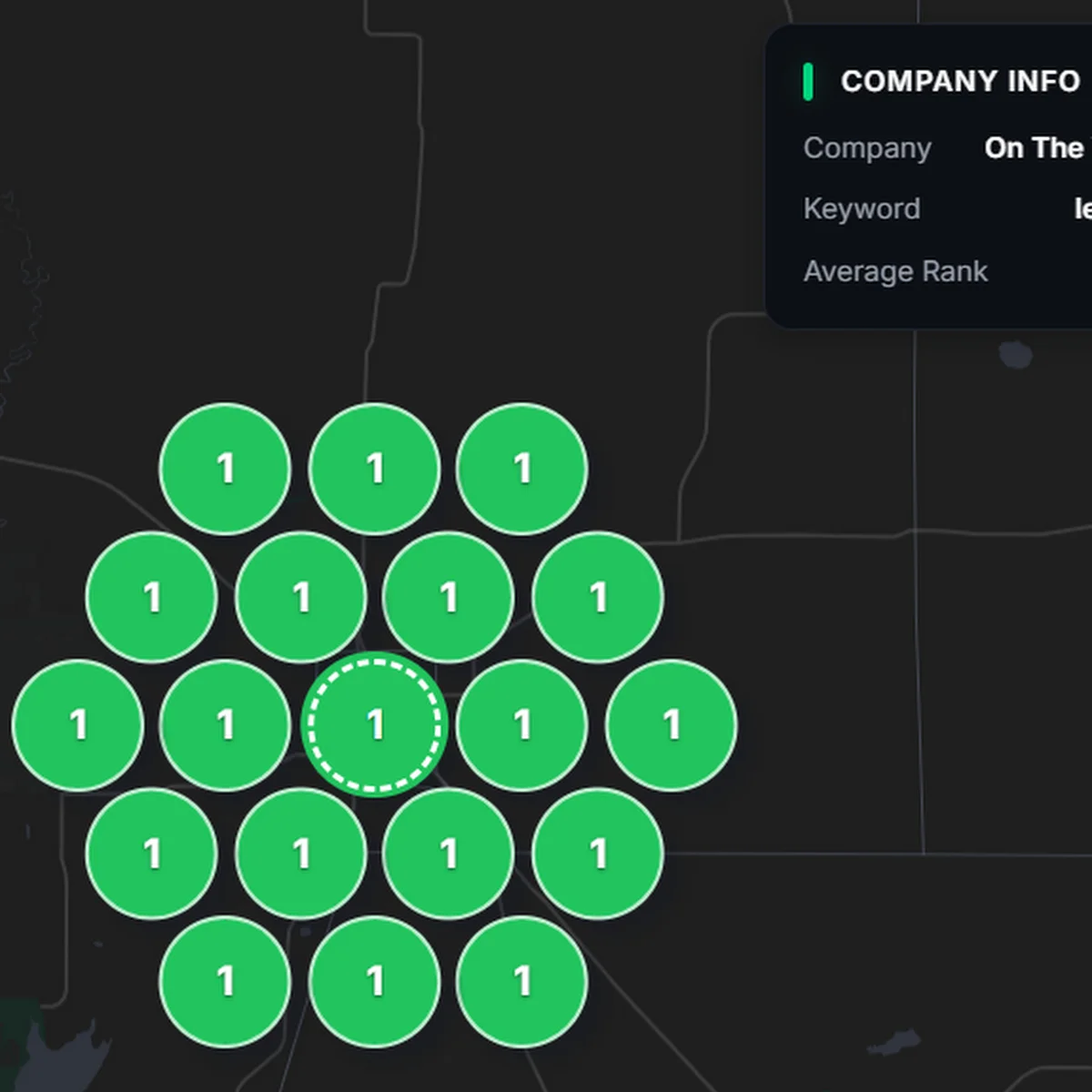
When On The Way Plumbing came to me, they were ranking in the top five on Google Maps in their own area and basically nowhere in the surrounding towns. We filled out their profile completely, built out their location and service area pages, and kept the photos, posts and reviews coming.
Now they rank mostly #1 to #2 across the five closest towns they serve. Here’s one of their Gecko Grid rank scans, which checks their Maps position from 19 points around their location:
What not to do
When you’re invisible on Google, shortcuts are tempting. These three cause more damage than they’re worth:
- Never buy reviews. Fake reviews get removed, and they can get your profile suspended.
- Never buy backlinks. Cheap link packages hurt your website more often than they help.
- Never use Fiverr for anything related to your business’s SEO. I’ve cleaned up after enough of those gigs to say this flatly.
How to check where you actually show up
Searching your own business from your office doesn’t tell you much, because Google already knows where you are. Better ways to check:
- Search your main service plus a town name (“plumber Glens Falls”) in a private browser window.
- Ask a friend in a nearby town to search from their phone.
- Use a map rank grid tool like the Gecko Grid scan above, which checks your position from many points at once.
Frequently asked questions
Why is my business not showing up on Google Maps even though it’s verified?
Verification only makes your profile eligible to show. Google still ranks it by relevance, distance and prominence. Verified profiles that are missing categories, services, photos, reviews or a website with location pages usually sit too low to be seen, especially for searchers who aren’t close to the business.
How many Google reviews do I need to show up in the map pack?
You can compete in the map pack with about 10 Google reviews. The businesses holding the #1 spot in most local trades typically have 200 or more.
Should a home-based business show its address on Google Maps?
No. If you run the business from your home and customers don’t come to you, hide your address and set a service area. If customers visit your location or you have a real office, show the business address.
Can I add keywords to my business name on Google?
Only if those words are part of your real, registered business name. Adding extra keywords to the name breaks Google’s guidelines and can get your profile suspended.
Why does my business show up in one town but not the next town over?
Distance is one of Google’s biggest map ranking factors. The farther a searcher is from your business location, the harder it is to rank. Location and service area pages on your website, plus a complete profile and steady reviews, help you reach nearby towns, but results far from your address will be limited.
How long does it take to show up on Google Maps after fixing my profile?
A new or newly verified profile can appear within days, but climbing into the top three takes longer and depends on your competition, your reviews and how far searchers are from you. Expect to keep posting, adding photos and earning reviews for months, not weeks.
Want me to take a look?
If your business isn’t showing up on Google Maps and you’re not sure why, I’ll take a free 10-minute look at your profile and website and tell you the two or three things holding you back. Get in touch here, or read more about my local SEO services.